What Happens After You Send Account Details
Once the payment clears, an account-login order follows a short sequence: the store signs in to the HoYoverse account, buys the chosen pack in the in-game shop, signs out and clears the login history on its side. The published delivery window for Genshin Impact is 5 to 30 minutes, around the clock, so most of the waiting happens inside a single half-hour. Knowing the steps in advance is what turns that window into a quiet pause rather than a nervous one.

Key takeaways
- Sequence: sign in, buy the pack in the shop, sign out, clear the login history on the store's side.
- One active session per account, so the game should stay closed while the order runs.
- Order Record shows the status at any time; a confirmation email arrives when the order completes.
- After delivery, change the password and keep two-step verification reachable, with any code sent only through the order chat.
The four steps, in the order they happen
The first step is invisible from the buyer's side: payment is confirmed and the order enters the queue. Nothing is asked of the account at this point, which is why the page tells buyers to have the details ready rather than to do anything with them. From here the order simply waits for its turn, and the queue is the variable that explains the width of the published window.
The second step is the sign-in. The store opens the account with the email and password supplied, which is the moment the buyer's own session has to be out of the way. This is the step the page's instruction about one active session is aimed at, and it is the reason the game should be closed before payment rather than after.
The third step is the purchase itself, made in the in-game shop with the pack the buyer selected. Because the purchase happens in the shop, the in-game bonuses that come with a pack are applied the same way they would be for a self-purchase, and the pack that is bought is the pack that was ordered.
The fourth step is the clean-up. The store signs out and clears the login history on its side, and a confirmation email is sent when the order completes. The Order Record holds the status throughout, so the state of an order can be checked without asking anyone.
What you can see while each step runs
The table below lines the sequence up against what the buyer can observe, which is usually the only thing anyone wants during the wait. Every entry comes from the client's own Genshin page; the middle column is the published step, and the right-hand column is where its progress shows up.
| Stage | What happens | Where it can be checked |
|---|---|---|
| Payment confirmed | The order enters the processing queue | Order Record |
| Sign-in | The account is opened with the details supplied | Order chat, if a prompt appears |
| Purchase in the shop | The chosen pack is bought inside the game | Order Record |
| Sign-out and clean-up | Session ends; login history cleared on the store's side | Account, once you log back in |
| Completion | Confirmation email is sent | Email inbox and Order Record |
Worked example: a window read from two clocks
Put a concrete order on the published window and it stops being a vague wait. Assume payment is confirmed at 19:05 and the order sits in a normal queue; the assumptions are the client's published window of 5 to 30 minutes for this title and its note about longer queues during the first hours of a new banner. The clock arithmetic is the author's.
Take the fast end first. 19:05 + 5 minutes = 19:10, which is the earliest the purchase can be complete. Take the slow end: 19:05 + 30 minutes = 19:35. The whole window is 19:35 − 19:10 = 25 minutes wide, so the honest expectation for this order is somewhere inside a twenty-five minute band that closes around 19:35. If the order was placed minutes after a banner launched, the right-hand number is the one to plan around.
Now price the same order, because the wait is easier to sit through when the arithmetic behind it is settled. The 1980+260 pack is listed at $21.67 against a list price of $29.99, so the difference between the two published columns is $29.99 − $21.67 = $8.32. As a share of the list price that is $8.32 ÷ $29.99 = 0.277, or about 27.7%.
One more division finishes the picture. The pack contains 1980 + 260 = 2240 crystals, and $21.67 ÷ 2240 = about $0.0097 per crystal. Genesis Crystals convert to Primogems one for one, so that is also about $0.0097 per Primogem — and at 160 Primogems to a Wish, the pack covers 2240 ÷ 160 = 14 whole Wishes exactly, with no remainder.
The ladder behind the pack you just bought
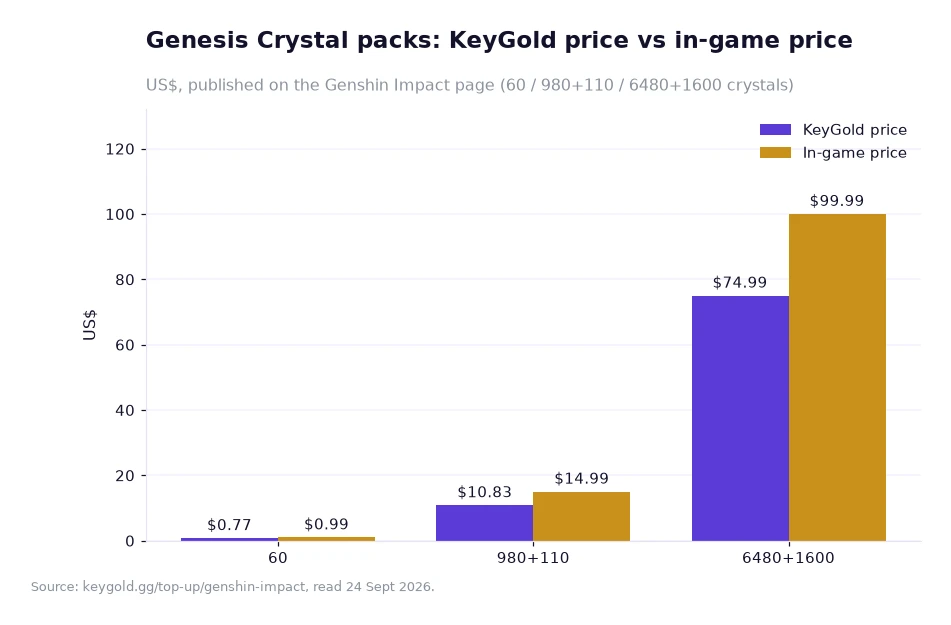
The chart draws three tiers of the ladder the order was placed from, each as a pair of bars: 60 crystals at $0.77 beside an in-game price of $0.99, the 980+110 tier at $10.83 beside $14.99, and the 6480+1600 tier at $74.99 beside $99.99. The source line under it is the Genshin Impact top-up page, read 24 Sept 2026 — the same page the four steps above were taken from.
KeyGold publishes its prices in the same two-column shape on every title it carries, so that part of an order is settled. What differs between titles is the list of details an order needs, and that is worth comparing before choosing where to spend. Endfield asks for the official login email and password, the Player UID, the nickname and the server. Genshin asks for the account email, the password and the server. Whiteout Survival asks for the sign-in method the player actually uses, plus the account and password. The same four-step sequence runs underneath all of them, with a different front door.
Anyone comparing before ordering can see every title's ladder and requirements on the store's top-up pages, and the delivery window is printed on each game page rather than in a single summary, which is helpful because the windows differ: Genshin opens at 5 minutes, Whiteout Survival at around 10, and Endfield at 15.
After delivery: the password and the prompts
The routine that follows a completed order is two lines long. Change the password on the account, and keep two-step verification reachable in case a prompt arrives the next time a session opens. The page's advice is to send any verification code through the order chat only, which keeps the exchange inside the channel where the order itself lives.
It is worth being precise about what the store does and does not do here, because the phrase login history cleared can sound broader than it is. It describes the store's own side: it signs out of the account it opened and clears the history it created. The password change afterwards is the buyer's own step, and it is published as advice rather than folded into the service.
The published support signals are the same as on the other game pages: live chat staffed 24/7 by a real person before and after the order, the Full Refund Guarantee for an order that is not delivered or cannot be used, and a published rating on the game page itself, which for Genshin Impact stands at 5.0 from 796 evaluations.
Frequently asked questions
How long does it take once the details are sent?
The published window for Genshin Impact is 5 to 30 minutes, around the clock, with longer queues in the first hours of a new banner. The Order Record shows the status of the order while it runs, and a confirmation email arrives when it completes.
Should I stay logged out while the order is processed?
Yes. The page states that one session can be active per account, so the game should remain closed until the purchase is finished. The store signs out and clears the login history on its side once the order is complete.
Sending the details with a plan
Close the game, send the email, password and server in one message, then leave the account quiet for half an hour. That is the entire procedure, and it matches the four published steps exactly. If a prompt appears during the wait, answer it through the order chat; if nothing has changed by the far end of the published window, the help center and the live chat are the places to ask, both of them open around the clock.
Buyers who come to a cheap genshin top up expecting a long handover are usually surprised by how little there is to it: pay, wait, log back in, change the password. The pack ladder is published, the window is published, and the steps in between are the same every time.
Figures in this article come from the client's own pages on keygold.gg — the Genshin Impact top-up page, the Arknights: Endfield page and the Whiteout Survival page — read 24 Sept 2026[1]. Prices are shown in USD; where a reader's own currency is involved, a bank may add its own conversion fee. The clock window and the per-crystal figures are the author's arithmetic on published numbers and are examples rather than forecasts.